

Databases
HTTP Error 500.0 - ANCM In-Process Handler Load Failure or Database Source - How to resolve?
- 673
- por Net Asp Hosting - Support Blog
- Publicado 15/1/2022
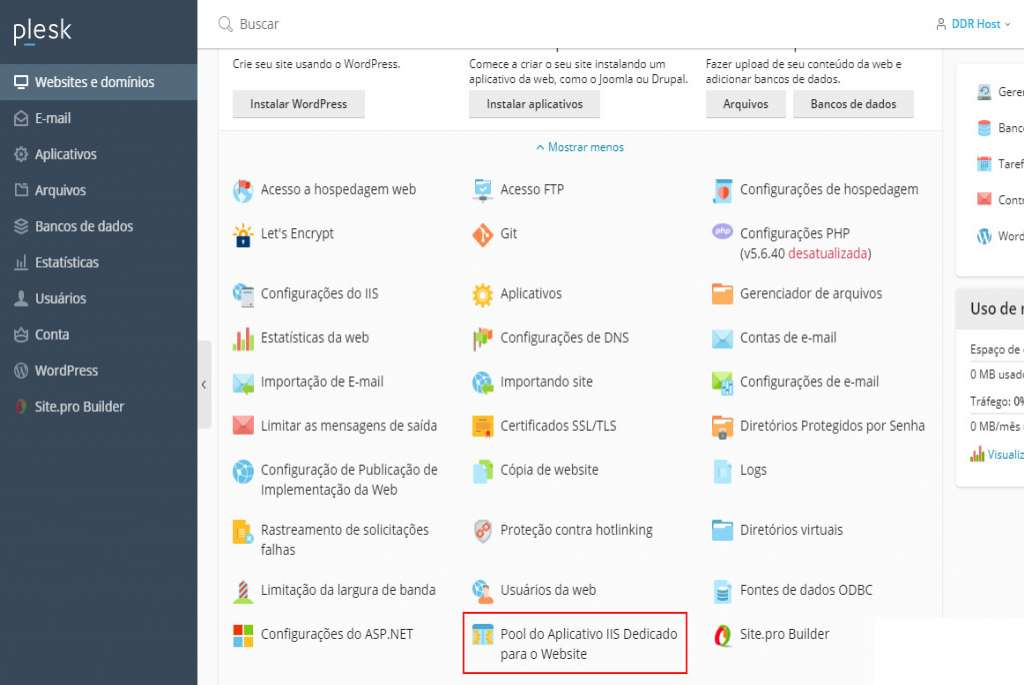
The "HTTP Error 500.0 - ANCM In-Process Handler Load Failure" occurs because your ASP.NET Core application was developed for the 64-bit architecture, while the domain`s IIS is configured to run 32-bit scripts, or vice versa. To resolve this issue, follow this tutorial to change the IIS architecture for your domain.
(STEP 1) Access your hosting`s Plesk control panel and locate the button labeled "DEDICATED IIS APPLICATION POOL FOR THE WEBSITE."
(STEP 2) On this page, check or uncheck the "Enable 32-bit applications" option as needed. Unchecking this option configures IIS to run in 64-bit mode.
That`s it; your IIS architecture has been changed. Simply wait a few minutes for IIS to restart automatically.