

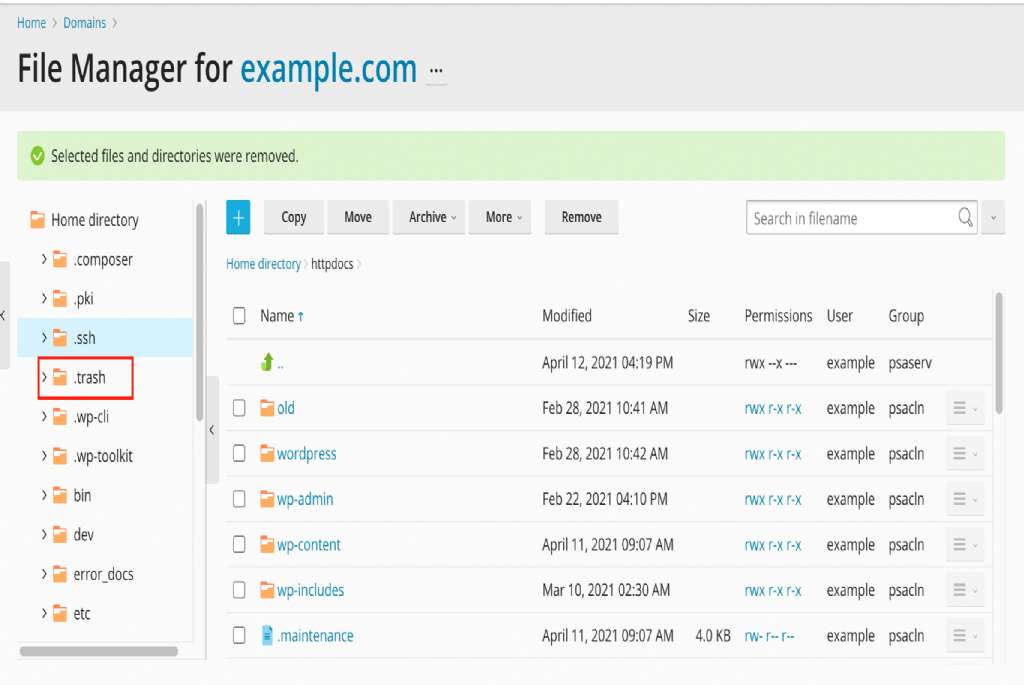
When deleting a file in the Plesk File Manager, you will be asked if you want to move it to the Trash.
Directly below that message, a checkbox will appear with the text: "Skip trash and permanently remove file.ext"
If you do not permanently remove the files, they will not be deleted and will continue to occupy server space, potentially affecting your hosting plan limits.
To empty the trash, follow these steps:
1). Open the File Manager.
2). Upon opening your website`s local files, a link to the Home Directory will appear; click on it.
3). Locate the `.trash` folder and click on it.
4-A). Option 1: Select the files within this folder and delete the selected items to free up space and clear the trash.
4-B). Option 2: Click the **REMOVE** button and then **EMPTY TRASH**; this action will delete all files in the trash, freeing up space on your hosting account.